Cyclist climbing a mountain switchback into low evening sun
Data field for Garmin Edge® cycling computers

You'll know on the climb.Not on the sofa.

PowerPeak Live puts your peak power for 31 intervals — 1 second to 60 minutes — next to the personal records you're chasing, recalculated every second while you ride. Break one and the screen tells you there and then, while you can still decide what to do about it.

7-day free trial €5.99 / year Cancel anytime No account in the app

Edge 540 · 550 · 840 · 850 · 1040 · 1050 · MTB — power meter required

v6.1.0

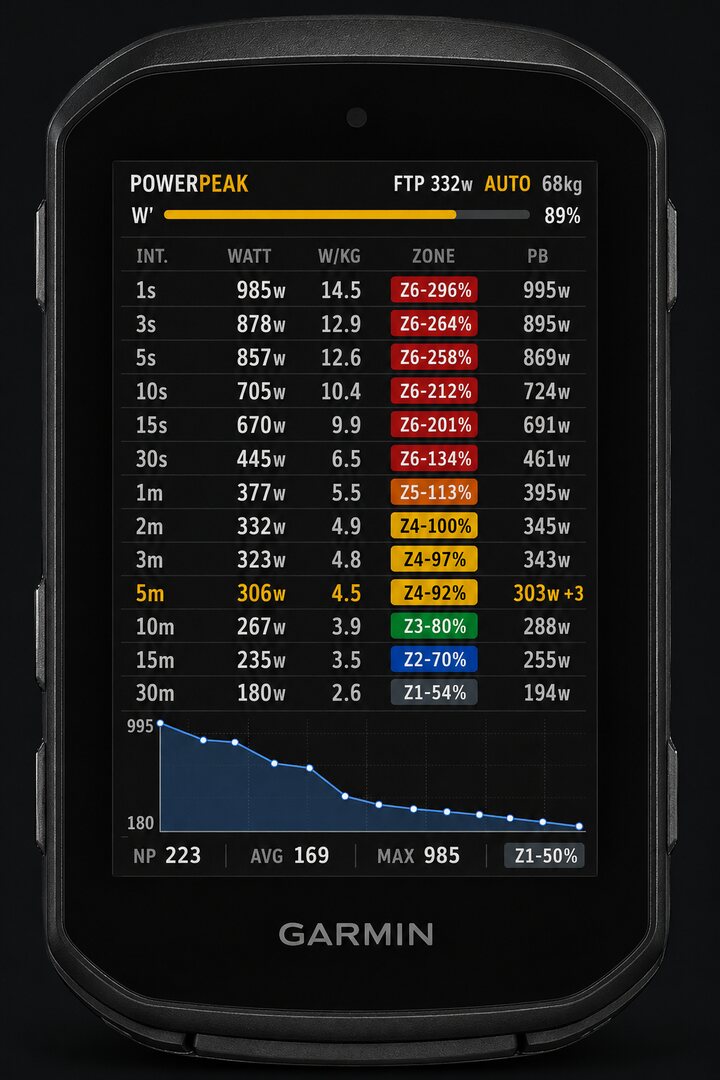
NEW RECORD PowerPeak Live running on a Garmin Edge: the 5-minute row has just broken — 306 W against a 303 W record, +3.

The field on a Garmin Edge — a 5-minute record breaking mid-ride.

Built for the moment you break a record

Live peak table, 1s to 60m

Your best 1s, 5s, 1m, 5m, 20m, 60m — or any other of the 31. Every value is an exact sliding-window maximum, updated every second.

The number to beat

The PB column locks your records when the ride begins, so the target never moves under you. Break one and it lights up with your gain.

Zero setup, auto FTP & weight

Both come straight from your Garmin profile. Zones, W/kg and W′ are correct from the first pedal stroke.

W′ balance

Your anaerobic battery, live, on the Skiba differential model. Watch it drain in the attack and refill on the wheel.

Power curve, today vs your records

The session curve drawn over your all-time curve. One glance tells you which part of your engine is having a good day.

Fits every screen & theme

Full-page, half-page or small field. The layout adapts automatically, in day and night themes.

Accuracy is the product

Solo cyclist on an empty mountain road in morning mist
POWERPEAK89%
1s985Z6-296995
5s857Z6-258869
1m377Z5-113395
5m306Z4-92303 +3
10m267Z3-80288
30m180Z1-54194
Night · full field
POWERPEAK76%
3s878Z6-264895
15s670Z6-201691
30s445Z5-134461
2m332Z4-100345
3m323Z4-97343
15m235Z2-70255
Night · data screen
POWERPEAK89%
1s985Z6-296995
5s857Z6-258869
1m377Z5-113395
5m306Z4-92303 +3
10m267Z3-80288
30m180Z1-54194
Day theme

Exact, every second

Peaks are computed with integer sliding-window sums at 1 Hz, with zero floating-point drift over hours. Normalized Power follows the standard 30-second rolling definition.

Matches your analysis platform

The same definitions your post-ride tools use for peak power. Validated by replaying real ride files through the engine and comparing watt-for-watt against the Garmin ride file and Strava.

Crash-tested persistence

Sessions survive profile switches and restarts. Records are saved on-device automatically.

Why I built this

Angelo, the developer, riding his road bike on a mountain road at dawn
Angelo · developer of PowerPeak Live

I'm Angelo — a software engineer who spends far too many weekends on mountain passes. For years it was the same story: I'd empty myself on a climb, sure I'd done something, then only find out hours later at a screen whether I actually had. That gap bothered me enough to build the field I wanted on my own bars — one that tells me while I'm still turning the pedals, when I can still do something about it. I kept refining it over real rides until the numbers on the Edge matched, watt for watt, what my analysis tools told me after. That field is PowerPeak Live.

Read the version history on the Connect IQ Store →

Close profile of a cyclist riding hard

From install to your first record

1

Install from the Connect IQ Store

The 7-day free trial starts by itself. To keep it, get a license key at the bottom of this page and paste it in Garmin Connect.

2

Add it to a data screen

On your Edge: data screen settings → choose a 1-field layout → Connect IQ → PowerPeak Live.

3

Ride

FTP and weight load from your profile. The table fills as you go and your records save themselves.

What you need

Solar variants included. Requires a power meter over ANT+ or Bluetooth, and Connect IQ system 5.2.2 or later.

Edge 530, 830, 1030 or Explore? Not supported today — their Connect IQ version is older than the one PowerPeak Live is built on.

Leave your model and you'll be the first to hear if that changes: this list decides which platform gets built next.

How to install it

Two short jobs: get the field onto your Edge, then drop it on a data screen. You do it once, and most of the time is the sync.

Get it onto your Edge

PowerPeak Live Data field · Garmin Edge Download Free trial included sync POWERPEAK on your Edge
Download in the store, sync to the device — trial included.
  1. Open the Connect IQ Store — the app on your phone, or the store in a browser — and search PowerPeak Live.
  2. Choose Download and pick the Edge you want it on. The free trial is attached automatically — no card, no account to create.
  3. Let the Edge sync: over Bluetooth through Garmin Connect on your phone, or with Garmin Express over USB or Wi-Fi. The field lands on the device at the next sync.

Add it to a data screen

POWERPEAK 89% 5s 857 869 1m 377 395 5m 306 303 +3 10m 267 288 30m 180 194
A full-page layout shows the whole table; the fluo row is a record breaking.
  1. On the Edge, open Activity Profiles → your profile → Data Screens.
  2. Add a screen (or edit one), pick a layout with a Connect IQ field, then choose Connect IQ Fields → PowerPeak Live. A full-page, single-field layout shows the whole table.
  3. Start your ride. FTP and weight load from your Garmin profile, the table fills as you go, and your records save themselves.
Don't see it in the field list? A Connect IQ field only appears there once the download has finished syncing to the device — sync once more and make sure the Edge isn't still updating. It needs a power meter over ANT+ or Bluetooth and Connect IQ system 5.2.2 or later.

Same engine, free, for speed and heart rate

Two free companion fields by the makers of PowerPeak Live. Same 1 s to 60 min peak table, same personal records, no subscription.

Speed Peak

Your best speed over every interval, with the distance covered. Records in km/h or mph, following your Edge.

Get it free on the Connect IQ Store

BPMPeak

Your highest sustained heart rate over every interval, with % of max and the zone. Max HR and zones from your Garmin profile.

Get it free on the Connect IQ Store

Get your license key

7-day free trial on your Edge. Then pick the license that suits you. Same app, same key by email.

Annual

€5.99/ year

Renews every year. Cancel anytime from the customer portal.

Get the annual key

Lifetime

€14.99once

One payment, no renewal, every future version included.

Get the lifetime key

After payment you get a key by email.
Garmin Connect → PowerPeak Live settings → License key → paste → sync.

Already had PowerPeak Live installed before 6.1? It stays free until December 31, 2026 — nothing to do.

Manage subscription

Before you buy

How do the free trial and the subscription work?

The field starts a 7-day trial by itself the first time it runs — no card, no account. To keep it, get a license key here on this page (€5.99 a year, cancel anytime), paste it once in Garmin Connect → PowerPeak Live settings → License key, and sync. The next ride with your phone connected activates it. If you already had PowerPeak Live installed before version 6.1, it stays free until December 31, 2026 — nothing to do.

How do I activate my key?

Garmin Connect app → your Edge → Connect IQ → PowerPeak Live → Settings → paste the key in “License key” → sync. On the next ride with your phone connected the field activates it by itself.

Does the field need my phone during the ride?

No. It checks the subscription every few days when the phone is connected, and keeps working for 30 days without a check.

Can I use one key on two Edge units?

Yes, up to 2 devices. You manage them from the subscription portal.

Will the numbers match Strava and TrainingPeaks?

For peak power, yes. The field uses the same sliding-window definition those platforms use, computed on the device instead of after the ride. Small differences can appear only if your platform smooths or re-samples the file on upload — that's the platform, not the field.

Where do FTP and weight come from? Can I override them?

Straight from your Garmin user profile, so zones and W/kg are right from the first pedal stroke — that's what the AUTO tag next to FTP means. You can override either value in the field's settings if you'd rather train to your own number.

Which intervals can I display?

All 31 are tracked. How many are shown at once depends on the layout you give the field: a full-page screen shows the full table, a half or small field shows a shorter selection. The records are always tracked in the background, whatever is on screen.

Where are my records stored?

On the device, written as they happen. They survive restarts, profile switches and mid-ride interruptions. Nothing is uploaded, and nothing depends on a phone being nearby.

Does it drain the battery?

The whole computation is integer arithmetic on a fixed-size buffer, once a second, with no network use — the kind of workload an Edge is built to run for hours.

Does it send my data anywhere?

Almost nothing. There is no account and no companion app. The field reads your power meter and your Garmin profile, and writes your records to your own device. The only network call is a licence check with our payment provider every few days, when your phone is connected: it sends your licence key and a device identifier — never your rides.

Something not working on a ride? Support.

Your next ride can be the one

The trial starts by itself the first time the field runs — no card, no account. If you keep it, €5.99 a year: every future version, cancel anytime. Already had it installed? Free until December 31, 2026.

Get it on the Connect IQ Store